MelBet Payment Methods Bangladesh | Deposit & Withdrawal Guide
MelBet Deposit Payment Methods Bangladesh
MelBet Withdrawal Payment Methods Bangladesh

MelBet Payment Methods

MelBet provides multiple payment options for depositing funds and withdrawing available balances. The payment-method interface can include local Bangladeshi payment services, international e-wallets, payment cards, cryptocurrency-related options and online banking systems.

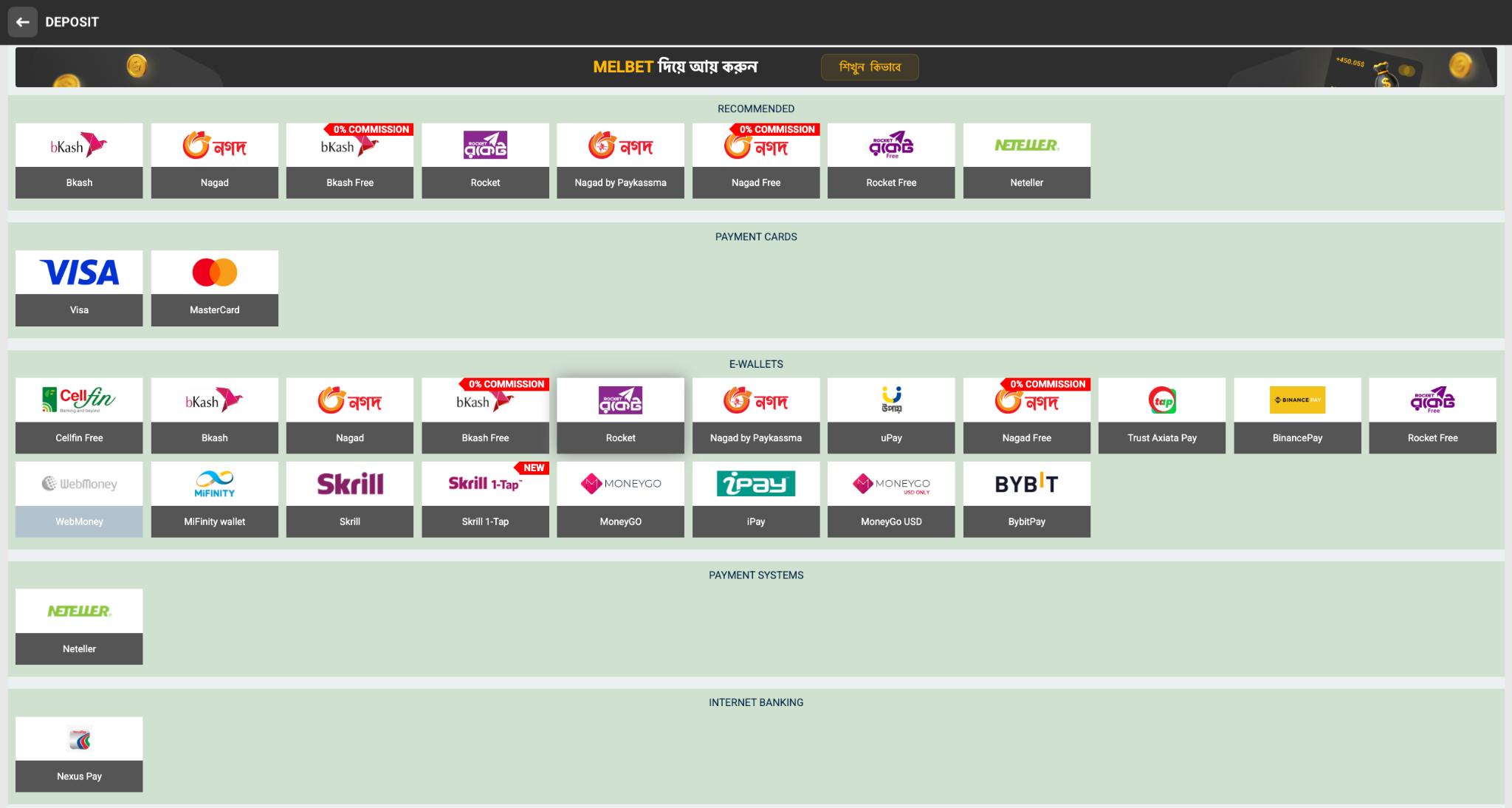
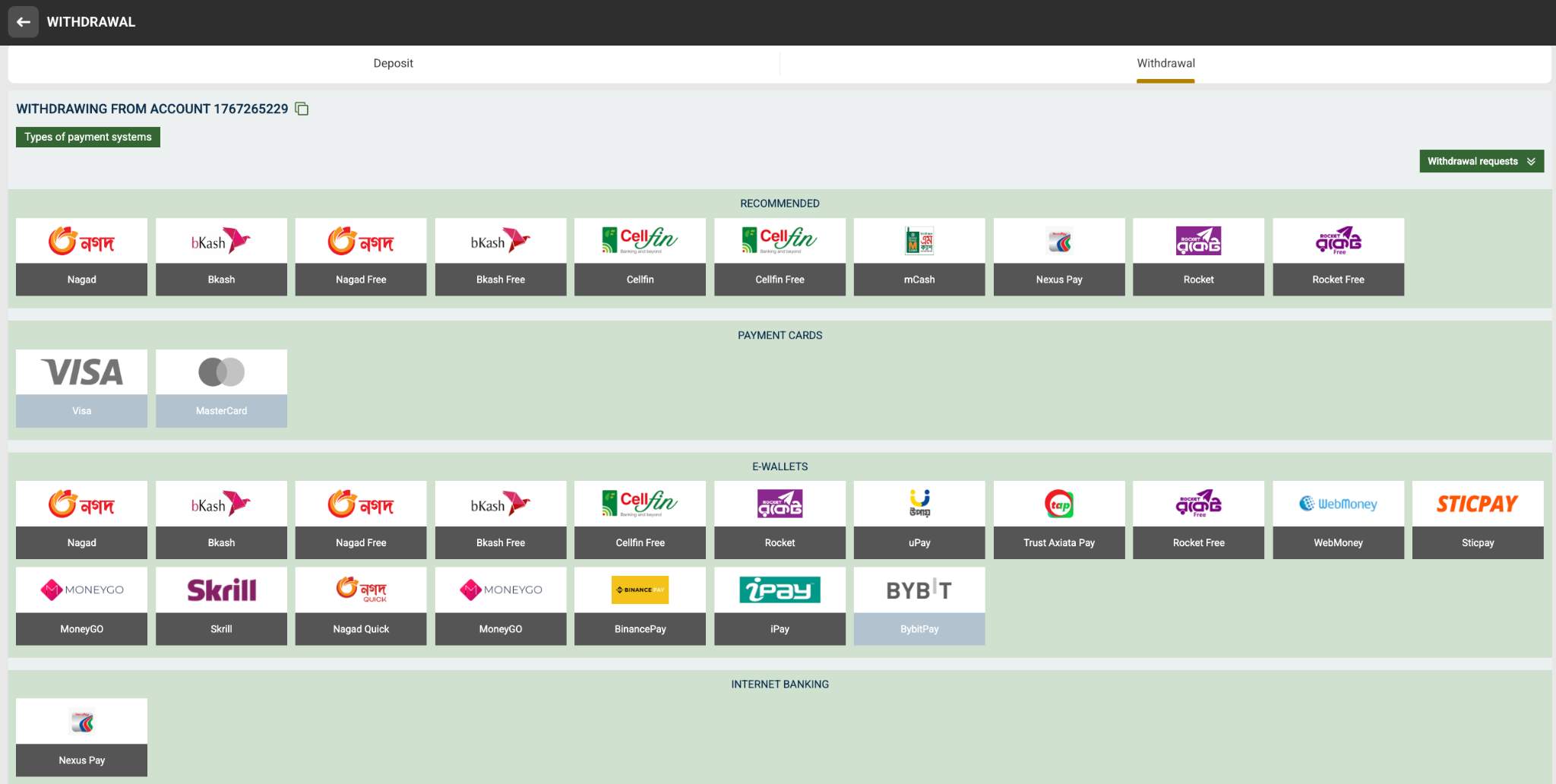
The two screenshots above show the payment methods visible in the MelBet deposit and withdrawal interfaces. Available methods can differ between deposit and withdrawal, and availability can also depend on account, country, currency and payment provider.

Below you can find a detailed explanation of the payment categories and the individual methods shown in the supplied screenshots.

Bangladesh & Local Payment Methods

Local payment methods visible in the supplied deposit and withdrawal screenshots.

Local & Mobile Payment Options

Bangladesh-focused payment methods

bKash

bKash appears in both the deposit and withdrawal interfaces shown in the supplied screenshots. It is one of the primary mobile financial service options displayed for local transactions.

Shown in screenshots

Nagad

Nagad is shown as a recommended payment option in both the deposit and withdrawal screenshots. It can be used where the method is available to the account.

Shown in screenshots

Rocket

Rocket is displayed in both payment interfaces and is included among the recommended local payment options.

Shown in screenshots

Cellfin

Cellfin appears in the withdrawal screenshot and as a free payment option in the e-wallet section. Availability depends on the payment interface shown to the account.

Shown in screenshots

mCash

mCash is visible in the recommended withdrawal payment section of the supplied screenshot.

Withdrawal screenshot

Nexus Pay

Nexus Pay is shown under Internet Banking in the deposit and withdrawal screenshots. It is one of the banking-related options visible in the supplied interface.

Shown in screenshots

Payment Cards

International card-based payment options shown in the supplied screenshots.

Visa & Mastercard

Card payment category

Visa

Visa is shown in the Payment Cards section of both the deposit and withdrawal interfaces.

Payment Card

Mastercard

Mastercard is also displayed as a payment-card option in both supplied screenshots.

Payment Card

MelBet E-Wallets

E-wallet and digital payment services visible in the supplied payment interfaces.

E-Wallet Payment Methods

Digital wallets and online payment services

Neteller

Neteller appears under the recommended section in the deposit screenshot and under Payment Systems.

Skrill

Skrill is shown as an e-wallet option in the payment interface.

Skrill 1-Tap

Skrill 1-Tap is separately listed in the deposit screenshot as an e-wallet option.

MoneyGO

MoneyGO appears in both supplied payment interfaces and is also displayed as a USD-specific option in the withdrawal interface.

iPay

iPay is visible as an e-wallet option in the supplied deposit and withdrawal screenshots.

uPay

uPay appears in the e-wallet section of the supplied payment screenshots.

WebMoney

WebMoney is shown as an e-wallet option in the deposit and withdrawal interfaces.

MiFinity Wallet

MiFinity wallet is visible in the deposit screenshot as an e-wallet payment method.

Bybit Pay

BybitPay is listed among the e-wallet payment options shown in the deposit interface and withdrawal screenshot.

BinancePay

BinancePay is displayed as an e-wallet payment option in the supplied interfaces.

Sticpay

Sticpay is visible in the withdrawal screenshot under the E-Wallets category.

Trust Axiata Pay

Trust Axiata Pay appears in the e-wallet section of the withdrawal interface.

Special Payment Options

bKash Free

The supplied screenshots separately list bKash Free as a payment option. It is presented separately from the standard bKash option.

Nagad Free

Nagad Free is separately displayed in both payment interfaces.

Rocket Free

Rocket Free is listed separately from standard Rocket in the supplied payment screens.

Nagad by Paykassma

This payment route is shown separately from standard Nagad in the supplied payment interfaces.

Cellfin Free

Cellfin Free appears as a separate payment option in the withdrawal screenshot.

MoneyGO USD

The withdrawal interface shows a separate MoneyGO USD option.

Payment Systems & Online Banking

Payment Systems

Additional digital and banking routes

Neteller

Neteller is displayed under the Payment Systems category in the supplied deposit interface.

Nexus Pay

Nexus Pay is displayed under Internet Banking in both supplied screenshots.

How to Deposit Using a MelBet Payment Method

General deposit workflow based on the payment interface shown in the supplied screenshot.

01

Open Deposit

Log in to your MelBet account and open the Deposit section from the account or cashier interface.

02

Choose a Payment Method

Select an available payment method such as bKash, Nagad, Rocket, card, e-wallet or another option shown for your account.

03

Enter Deposit Details

Enter the required amount and any payment information requested by the selected payment provider.

04

Complete Payment

Follow the instructions shown by the selected payment system and complete the transaction.

05

Check Your Balance

After the transaction is processed, check your MelBet balance and transaction history to confirm that the deposit has been credited.

06

Keep Transaction Information

Keep your transaction reference or payment confirmation until the deposit has been successfully credited.

How to Withdraw From MelBet

Withdrawal methods can differ from available deposit methods.

01

Open Withdrawal

Access the Withdrawal section from your account and review the payment methods currently available.

02

Select Your Method

Choose an eligible payment method. The withdrawal screenshot shows options including Nagad, bKash, Rocket, Cellfin, cards and several e-wallets.

03

Enter Required Information

Provide the payment account or wallet details requested by the selected method.

04

Submit Withdrawal Request

Enter the withdrawal amount, review the details carefully and submit the request.

Deposit vs Withdrawal Payment Methods

The two supplied screenshots demonstrate why users should always check the specific cashier section before making a transaction.

Payment Method Deposit Screenshot Withdrawal Screenshot Category
bKash Available / shown Available / shown Local / E-Wallet
Nagad Available / shown Available / shown Local / E-Wallet
Rocket Available / shown Available / shown Local / E-Wallet
Visa Shown Shown Payment Card
Mastercard Shown Shown Payment Card
Skrill Shown Shown E-Wallet
MoneyGO Shown Shown E-Wallet
WebMoney Shown Shown E-Wallet
BinancePay Shown Shown Digital Payment
BybitPay Shown Shown Digital Payment
Nexus Pay Shown Shown Internet Banking

Important Payment Information

Payment methods displayed inside MelBet can vary depending on country, account, currency, payment provider and whether you are making a deposit or withdrawal. A payment method visible in the Deposit section should not automatically be assumed to be available for Withdrawal. Always use the payment method currently shown inside your own account and carefully verify recipient/payment details before confirming a transaction.

Payment Security Tips

Always verify the payment method name and destination details before sending funds.
Never share your account password, OTP, PIN or payment-security credentials with another person.
Keep transaction receipts and payment references until the transaction is successfully completed.
Use only the payment instructions shown inside your account or from an authorized support channel.

MelBet Payment Methods Bangladesh

MelBet payment methods provide users with different ways to fund their account and request withdrawals. The supplied payment screenshots show a broad range of local mobile payment services, payment cards, e-wallets, digital payment systems and internet banking options.

MelBet bKash Deposit & Withdrawal

bKash is shown in both the MelBet deposit and withdrawal interfaces supplied for this guide. Users should select the bKash option displayed in their own account and follow the transaction instructions provided there.

MelBet Nagad Payment

Nagad is also displayed in both screenshots. Separate Nagad Free and Nagad by Paykassma options are additionally visible in the supplied interfaces.

MelBet Rocket Payment

Rocket is displayed as a recommended payment option in both the deposit and withdrawal screenshots. Rocket Free is also listed separately.

MelBet Visa & Mastercard

Visa and Mastercard are displayed under the Payment Cards section in both supplied screenshots. Card availability and transaction requirements should be confirmed from the current cashier page.

MelBet Skrill & MoneyGO

Skrill, Skrill 1-Tap and MoneyGO are shown among the available e-wallet options. The withdrawal screenshot also displays MoneyGO USD separately.

MelBet BinancePay & BybitPay

BinancePay and BybitPay are visible among the digital payment options in the supplied payment interfaces. The exact transaction flow depends on the payment option available to your account.

MelBet WebMoney, Neteller & MiFinity

The supplied screenshots also display WebMoney, Neteller and MiFinity Wallet among the international payment options.

MelBet Payment Methods for Bangladesh

For Bangladesh users, the supplied screenshots prominently display local options such as bKash, Nagad, Rocket, Cellfin, mCash and Nexus Pay alongside international payment methods. However, the payment methods shown to an individual account can change. Users should always check the live Deposit or Withdrawal section before initiating a transaction.

MelBet Payment Methods FAQ

What payment methods are shown for MelBet Bangladesh?

The supplied screenshots show bKash, Nagad, Rocket, Cellfin, mCash, Nexus Pay, Visa, Mastercard and several international e-wallet and digital payment methods.

Can I use bKash for MelBet deposits?

bKash is shown in the supplied MelBet deposit screenshot. The exact availability for an individual account should be confirmed in the current Deposit section.

Can I withdraw using bKash?

Yes, bKash is also displayed in the supplied withdrawal screenshot. Availability and requirements can vary by account.

Does MelBet support Nagad?

Nagad is displayed in both the supplied deposit and withdrawal interfaces.

Does MelBet support Visa and Mastercard?

Visa and Mastercard are displayed under Payment Cards in both supplied screenshots.

Does MelBet support Skrill?

Skrill and Skrill 1-Tap are displayed among the e-wallet payment options in the supplied screenshots.

Does MelBet support BinancePay and BybitPay?

BinancePay and BybitPay are both visible in the supplied payment interfaces.

Why can a payment method appear for Deposit but not Withdrawal?

Deposit and withdrawal systems can have different eligibility and processing requirements. A method visible for one transaction type should not automatically be assumed to be available for the other.

Are all payment methods available to every user?

Not necessarily. Payment-method availability can depend on country, currency, account, transaction type and payment-provider availability.